
Contextual Hints for Ads in Conversational AI
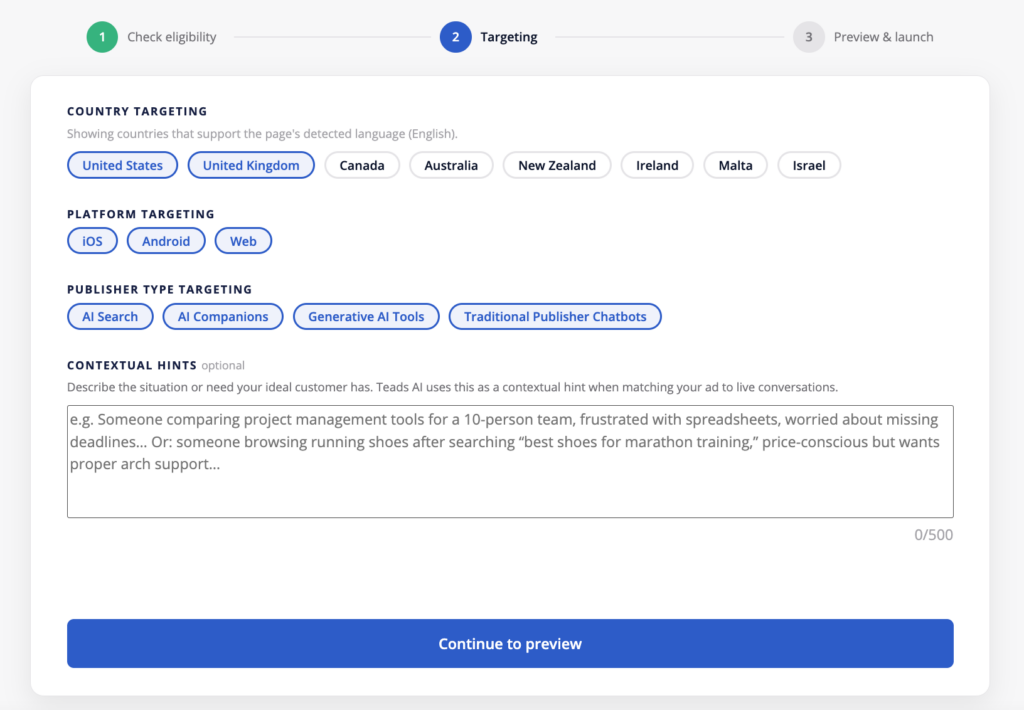
Contextual hints let you describe your product or service in your own words so Amplify’s AI can better match your ad to relevant conversations on ChatGPT. They’re set once, at campaign creation, on the Targeting step.
Why they matter
ChatGPT conversations don’t work like traditional publisher pages — there’s no article context around your ad. Contextual hints fill that gap by telling the system what you sell, who it’s for, and when it’s useful, so your ad can be matched to relevant conversations rather than just relevant keywords.
Contextual hints are used only for delivery on ChatGPT. They have no effect on other AI Search, AI Companion, or Generative AI Tool placements. They are required for any campaign delivering on ChatGPT traffic.
Where to add them
- Complete Step 1: Check eligibility.
- On Step 2: Targeting, scroll past Country, Platform, and Publisher Type targeting to the Contextual Hints box (500-character limit).
- Describe the situation or need your ideal customer has — not just your product.
- Continue to Step 3: Preview & launch.
How to write a good contextual hint
- Cover what, who, and when. What you offer (features, pricing, availability, service area), who it’s for (their needs or circumstances), and when it’s relevant (the situation or decision they’re facing). You don’t need all three in every hint.
- Add something new. Don’t just restate your ad copy or landing page headline — explain the connection between a feature and a real customer need. “Breathable running shoes” is a fact; “breathable running shoes for training in warm weather” is a hint.
- Write one clear idea, not a keyword list. A natural sentence outperforms a string of disconnected terms.
- Be specific and accurate. Vague hints (“great for everyone”) don’t help.
- Don’t write targeting rules. Hints describe your business — they aren’t delivery instructions. “Residential plumbing in Chicago” is a hint; “only show this to people in Chicago” is not something a hint can enforce. Use Amplify’s actual targeting controls (country, platform, publisher type) for that.
FAQ
Is this mandatory? Yes, for any campaign that includes ChatGPT in its delivery. The field shows as optional in the UI because it’s shared across placement types, but launch will require it once ChatGPT is selected.
Is there a character limit? Yes, 500 characters.
Can I edit the hint after launch? No. Contextual hints are set once during campaign creation and cannot be changed afterward.
Does this replace targeting? No — contextual hints inform relevance matching on ChatGPT; country, platform, and publisher type targeting still control where your ad can serve.