
NEW format in Amplify: Vertical Video
What is Vertical Video?
Vertical Video is a full-screen, sound-on 9:16 video format that runs across premium mobile web and in-app placements — the same screen orientation used on TikTok, Instagram Reels, and YouTube Shorts, but on the open web.
If you already run 9:16 video creative on social platforms, you can upload those same assets directly into Amplify. No new production required.
If you don’t have Vertical Video assets yet, reach out to your account manager — they can help you get started.
Creative specifications
| Specification | Requirement |
|---|---|
| Aspect ratio | 9:16 (vertical) |
| Recommended resolution | 1080 × 1920 px (minimum 720 × 1280 px) |
| Recommended length | 15–60 seconds |
| Maximum duration | 3 minutes |
| Maximum file size | 80 MB |
| Format | MP4 |
| Sound | Supported (serves the original video without sound, user has to unmute) |
Safe zones & overlay margin guidance
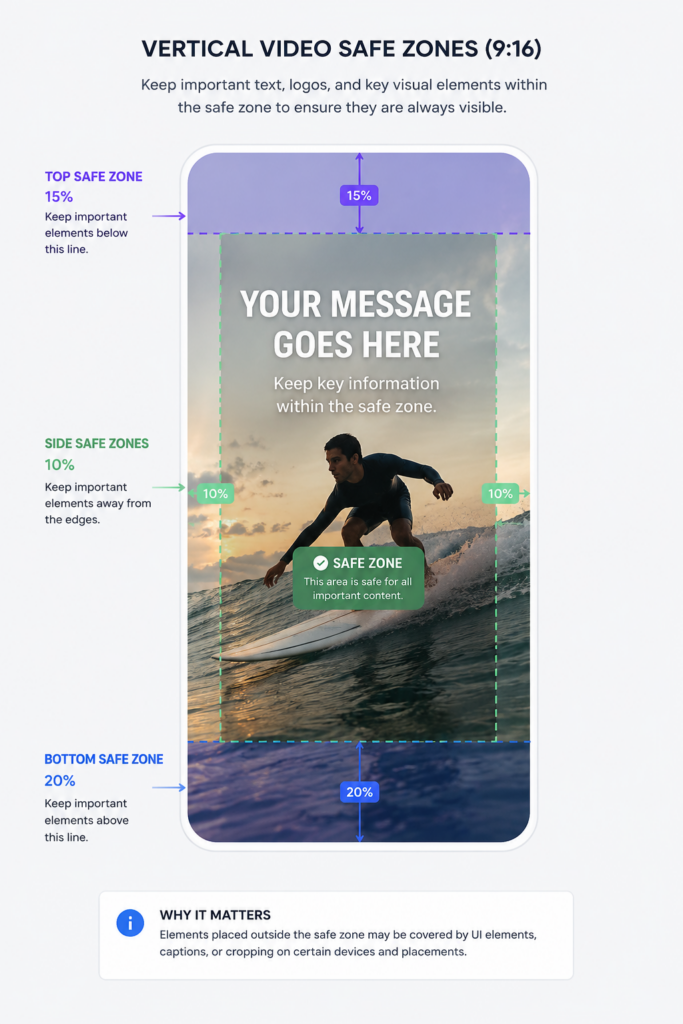
To ensure key visual elements, text, and branding remain visible across all placements, follow these recommendations:
- Top margin: Keep important text and logos at least 15% away from the top edge.
- Bottom margin: Keep CTAs, key messaging, and branding at least 20% above the bottom edge.
- Side margins: Leave approximately 10% padding on both sides for the best viewing experience across different mobile screen sizes.
Vertical Video campaign best practices
Campaign setup
- Select Multi-Format as the campaign type and upload Vertical Video creatives only.
- Set platform targeting to Mobile only.
- Use Hard + Soft conversions (2 ideally) for the strongest optimisation signal.
- Follow CBS best practices for whichever bidding strategy you use. (Target CPA, Target ROAS, Max Conversions, Semi Manual)
- Check for a Max Avg CPC cap — VV CPC can be higher than native. Remove or raise it if one is set.
- For additional optimization guidance, see our general Campaign Best Practices article.
Running the campaign
- Allow at least 7–10 days before evaluating — the algorithm needs time to learn in a new format.
- Avoid major changes during the initial learning period.
Video best practices
- Captions & subtitles: Include clear captions or on-screen text. While sound-on creative performs best, captions help communicate your message when users are browsing without audio.
- Audio: Voiceovers or people speaking on camera typically outperform background music alone.
- Native feel: User-generated style, authentic, mobile-first content generally delivers stronger engagement than highly produced videos.
- Hook: Capture attention quickly without using misleading or clickbait-style openings.
- Brand early: Introduce your brand or product within the first few seconds.
- Design for mobile: Use large, easy-to-read text and keep important content inside the recommended safe zones.
- Keep it simple: Focus on one clear message or call to action per video.
- Testing: Upload at least 4–5 creative variations to help identify your best-performing assets.
- Refresh creatives regularly: Rotate fresh creative throughout your campaign to reduce creative fatigue.
Where does Vertical Video run?
Vertical Video is served across premium mobile environments, including mobile web and in-app placements on trusted editorial publishers worldwide.
There is no manual supply separation — when you activate Vertical Video, all eligible vertical supply is included. Your existing optimisation tools continue to work normally.
Contact your account manager for more information about available inventory.
Performance & reporting
Performance is reported in Amplify using standard campaign metrics, broken down by format. Results vary by market, vertical, and creative quality — allow time for the optimisation models to learn before making significant changes.
Coming soon: sound on/mute rate, close interactions, scroll interactions, and video completions.
Beta limitations
As Multi-Format campaigns and Vertical Video are currently in Beta, you may notice some differences compared with generally available features:
- Some reporting metrics are still being introduced.
- Features and functionality may evolve throughout the Beta period.
- Performance will continue to improve as optimisation models learn from additional campaign data.
Frequently asked questions
How do I create a new Vertical Video campaign?
Follow the standard campaign creation process in Amplify. When you reach the creative format step, select Multi-Format (formerly Clip) and upload your 9:16 video assets.
Can I add Vertical Video to an existing live campaign? Yes — edit your existing Multi-Format (formerly Clip) campaign and upload your 9:16 video assets. No new campaign needed.
Do I need a separate campaign to run Vertical Video? No. You can run Vertical Video on its own, Clip on its own, Standard Native on its own, or all together in the same Multi-Format campaign.
What happens if I only upload one format? Your campaign will run using that format only. If you upload multiple formats, Teads’ AI-powered engine automatically selects the best-performing format per every impression.
Can I use the same videos I run on social media? Yes, provided they meet the creative specifications above. No additional editing required.
What if I don’t have 9:16 video assets? Reach out to your account manager — they can help you get started.
Will adding Vertical Video hurt my existing campaign performance? No. Spend only shifts to Vertical Video when the AI predicts it will perform competitively. If another format is expected to perform better, delivery adjusts automatically.
Is Vertical Video available for all campaign objectives? Yes — all campaign objectives and bidding strategies are supported.
Is pricing different for Vertical Video? No. Same CPC model as other Amplify formats, with no additional fees.
Will the Vertical Video option be available via API? Yes. Multi-Format campaign settings are supported through the Amplify API.