
What is the Target ROAS for Search Conversion Bid Strategy?
Target ROAS for Search is an additional, advanced Conversion Bid Strategy mode that Outbrain offers exclusively to Search marketers.
The advanced Target ROAS algorithm has an improved ability to predict the conversion value for each auction using auction-level ROAS data and adjusts bids accordingly to achieve your desired return on ad spend (ROAS) goal.
What it does
- Predicts the conversion value for each auction using auction-level ROAS data
- Automatically adjusts bids to reach desired return on ad spend (ROAS) goal. If the predicted value for an auction is favorable, the algorithm will increase the CPC; conversely, if it is unfavorable, the algo will decrease the CPC or refrain from bidding altogether.
Who can use Target ROAS for Search mode?
This mode is available ONLY to marketers with the “Search” marketer type, where search campaigns with value-based conversion tracking needs to be enabled.
Performance requirements
First and foremost, you need to make sure that value-based conversion tracking needs to be enabled. To learn on how to send conversion values, read our article
For optimal performance, we recommend at least 20 daily conversions per campaign for the selected conversion action. This helps the algo learn reliably and optimize bids effectively.
Please note that higher conversion volumes generally lead to better performance.
How to enable Target ROAS for Search mode?
Target ROAS for Search is automatically enabled for all “Search” marketer type accounts. The setting sits within the Conversion bid strategy options on your Dashboard.
A familiar setup experience:
Target ROAS for Search uses the same fields and validations as previous Target ROAS.
- Create a new campaign:
- Choose “Target ROAS for Search” as the optimization type.
- Complete all fields as you would for tROAS (same inputs and validations).
- Confirm your target conversion and target ROAS align with your business goals.
- Edit an existing campaign:
- Open the campaign, choose “Edit,” and you can switch optimization type to or from Target ROAS for Search.
- Review your conversion setup and target ROAS when switching, as performance dynamics may change.
- Duplicate a campaign:
- Use “Duplicate” from the campaign actions menu.
- The duplicated campaign retains the Target ROAS for Search optimization type and all settings. Adjust budgets, dates, and any targeting as needed.
- Reporting:
- The campaigns table shows the optimization type for each campaign, including Target ROAS for Search.
Best Practices
- Start with a realistic target ROAS based on recent performance. Avoid aggressive targets if your conversion volume is near the minimum threshold.
- Maintain clean conversion definitions: ensure your “target conversion” is the primary KPI and is consistently attributed.
- Keep budgets and caps aligned with learning: sudden budget cuts or extreme CPC caps can disrupt optimization quality.
- Allow sufficient runtime: give the strategy time to learn before making major changes. Typically a few days to a week depending on volume.
How do I optimize my campaign with Target ROAS for Search enabled?
Once you’ve turned on your campaign and confirmed progress towards your goals after the initial learning period, very little manual campaign management is needed.
However, there are some guidelines that can help you scale your campaign if you’re happy with the performance or make adjustments if you’re not reaching your goals.
During Learning period:
- Once live, wait at least 48 hours before making any adjustments.
- If you’re optimizing towards a conversion lower in the funnel (0.5 – 3% conversion rate), consider adding another conversion (with 10-20% conversion rate) to expedite the learning period.
After learning period:
If you’re looking to scale your campaigns:
- Increase the campaign budget and wait 1-3 days between changes.
- If you are using a Bid Cap limit, and the scale is limited by that Bid Cap, you will see a “Maxed” indication in the CPC reporting column. In this case, navigate to campaign settings and increase the Bid Cap value to enable more scale.
If you’re are looking to improve performance:
- Double-check your conversion set up to make sure it’s working properly*.
- Make sure you’ve set up a realistic ROAS target. Setting unrealistic goals will cause the system to decrease your CPCs in order to not spend the budget if it’s not able to meet your goal. Refer to this article to learn more.
- Try out testing new ad combinations that could yield higher CTRs.
- Decrease the campaign budget by maximum 30% and wait 1-3 days between changes.
Working with max avg CPC:
- To hit your target ROAS while maintaining the highest number of conversions within that ROAS, the system will automatically adjust the CPC for each serving based on multiple data points.
- You are able to set a daily max avg CPC that will act as the maximum CPC amount you’re willing to pay for auctions with higher expected conversion rate. For best results, we suggest removing the max avg CPC or setting it as high as you’re willing to pay for high converting audiences.
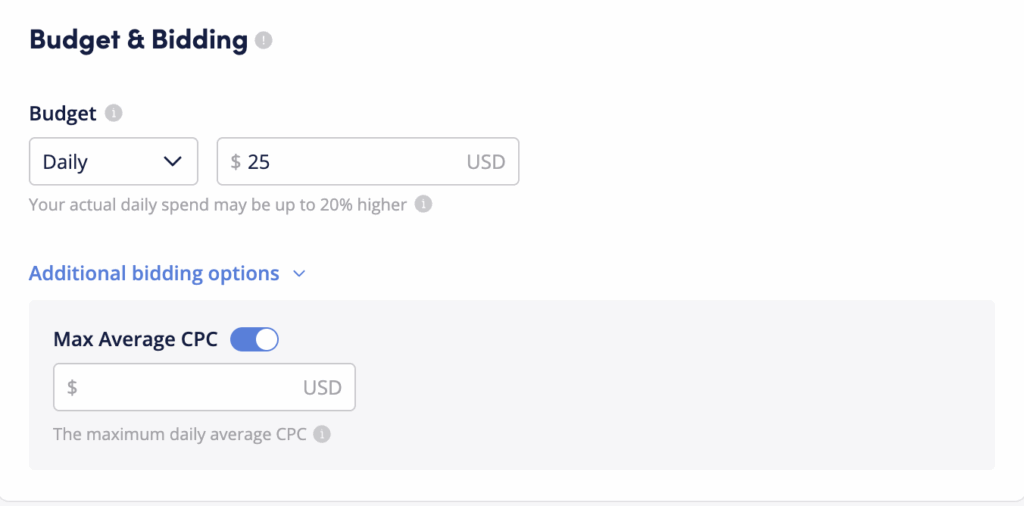
- There are cases where the system can get more conversions within your ROAS goal – in those cases, the system will increase the CPC. When the CPC reaches the Maximum CPC threshold (as defined by the max avg CPC), the system will no longer be able to raise bid higher. In that case, you will see a “Maxed” indication in the CPC column of your campaigns. To enable more scale and get more conversions with your target ROAS, either remove the Max avg CPC limit, or raise it in campaign settings so the algorithm can continue optimizing and maximizing the number of conversions.