
How to implement Outbrain on AMP pages?
Getting ready for Outbrain recommendations on Accelerated Mobile Pages (“AMP”) is simple. Please place the code snippet provided by your Outbrain Account Manager to the body of your page.
Below is an example of an AMP-enabled widget code snippet. Do not directly install this code into your pages – your code snippets will be delivered by your Account Manager.
Example of a basic Outbrain AMP code snippet:

Further examples, such as with consent or for sticky ads, can be found in the AMP widget guide:
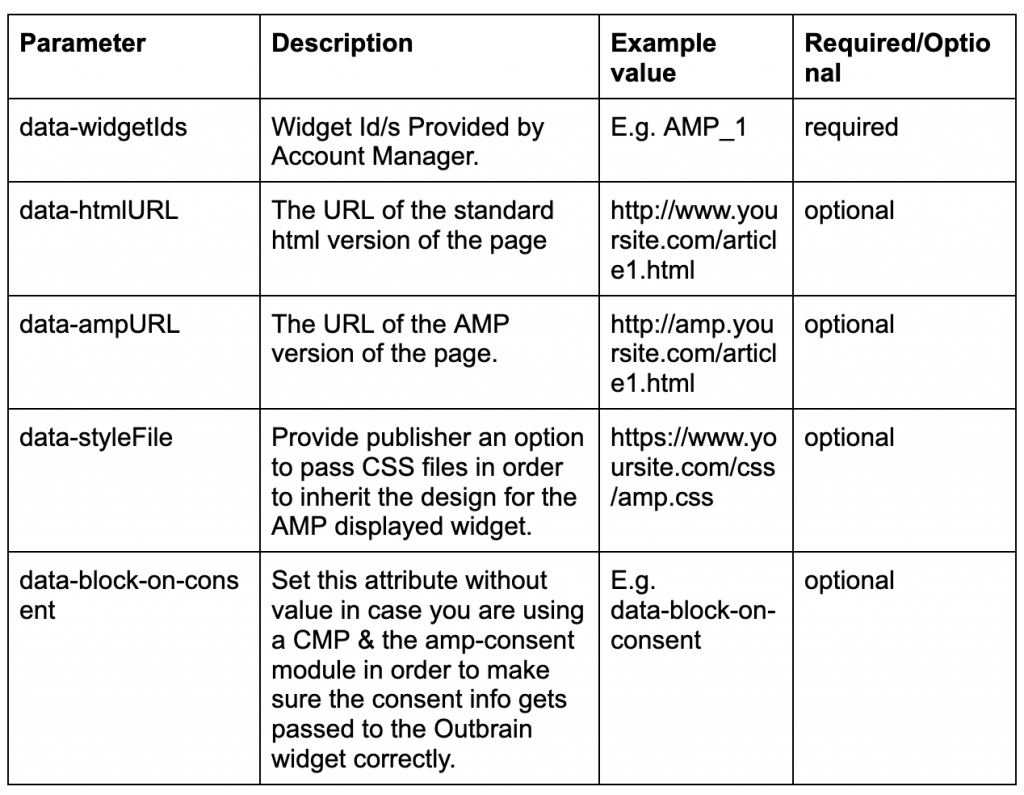
Below is a table of some required and optional parameters for the AMP widget:
AMP defines the sizes of all its elements to speed up the initial loading of the page, so the widget reacts dynamically to its actual size only after loading the page.
All AMP integrations should use the amp-embed solution (as provided by your Account Manager) in order to not cut off widgets and react dynamically to different widget sizes. The amp-embed is an alias to the amp-ad tag, deriving all of its functionality with a different tag name.
Additional notes:
- Some Outbrain features, like Read More Button, cannot be set up on AMP pages.
- Clicking an AMP-powered organic recommendation will take the user to a regular HTML page. Eventually, the click-through can also be AMP powered.
For more information, please refer to the AMP widget guide.